01
Start with the stationery you actually need
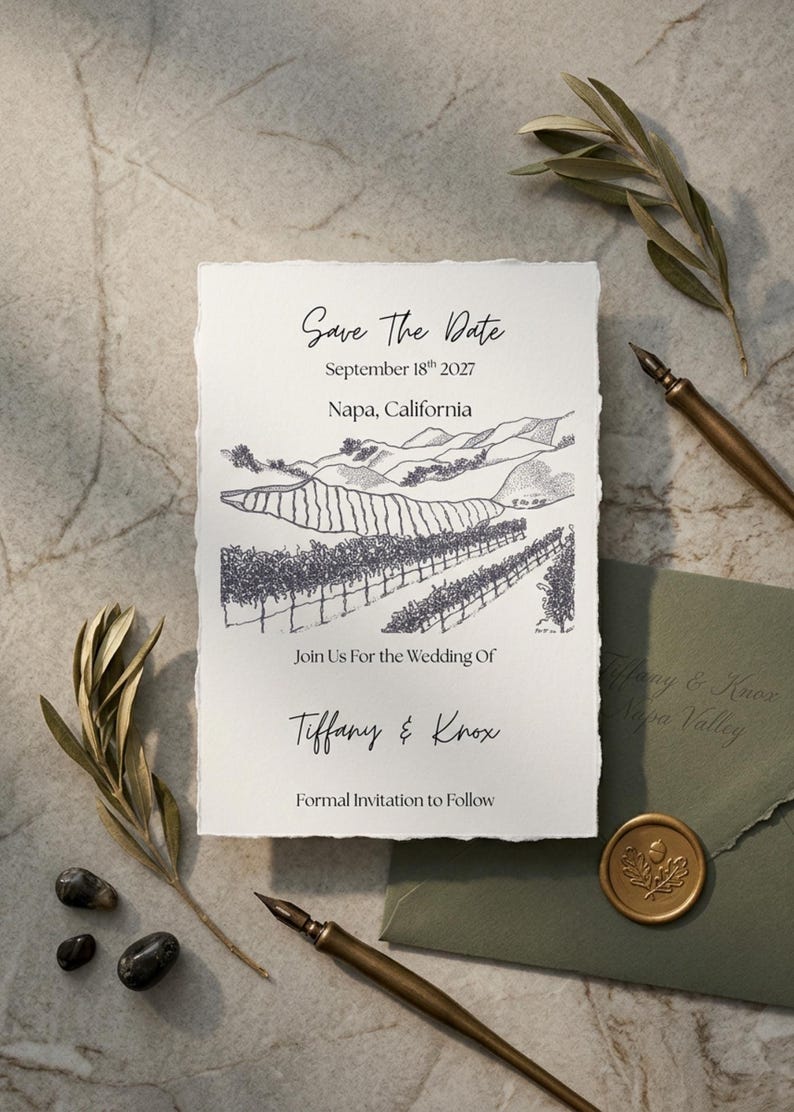
A save the date announces the day and destination before the full ceremony details are ready. An invitation asks guests to attend a specific event at a specific time. The current Napa Valley product is an editable save the date, so do not assume it includes an invitation, RSVP card or complete wedding suite.
- Save the date: names, wedding date and the actual town.
- Invitation: ceremony time, venue and reception details.
- Website or details card: travel information, schedule and responses.
02
Personalize the Napa Valley Canva template
The current save the date pairs a hand-drawn vineyard sketch with editable wording on the front and back. It includes a Canva Basics guide with video tutorials. The drawing stays the same, so choose it for the scenery rather than expecting a sketch of your own winery. A new drawing requires a separate conversation with the studio.
- Edit your names, date and town on the front.
- Check both sides for old placeholder text before exporting.
- Confirm any new illustration or coordinating piece before placing a custom order.
03
Give wine country guests what they need early
“Napa Valley” covers a long stretch of towns, including Napa, Yountville, St. Helena and Calistoga, so name the actual town on your stationery. Most out-of-town guests fly into a larger Bay Area or Sacramento airport and drive in, and lodging can fill quickly during the harvest season, roughly August through October. Put travel and room block details on one wedding website rather than on the card.
- Say whether you are providing a shuttle, since many guests will be drinking wine.
- Separate any welcome tasting, the ceremony and a farewell brunch.
- Set your RSVP deadline around the dates your vendors need final numbers.
04
Plan the printing and mailing as separate steps
The Napa Valley save the date is a 5 × 7 front-and-back design. Confirm the printer’s file, bleed and two-sided alignment requirements before exporting. Print one proof, review both sides, then choose envelopes that fit the finished card. Check postage for the assembled mailing rather than budgeting only for the digital design.
- Proof names, date, location and wedding website.
- Test a website link or any QR code you choose to add.
- Confirm paper, envelope fit and postage separately from the template purchase.
Make it your own
A starting point for your save the date wording
Replace the placeholders with your confirmed details. Adjust the hosting line and tone to fit your celebration.
Save the datefor the wedding of[Name] and [Name][Wedding date][Town], CaliforniaInvitation to followMore details: [wedding website]More wedding invitation wording guidance
Final pass
Before you download or print
- Confirm you need a save the date rather than an invitation.
- Review the vineyard sketch and both sides of the layout.
- Use the actual town and a working website address.
- Confirm any separate coordinating design request.
- Print a two-sided proof before the full order.
Questions before choosing
Napa Valley wedding invitations & save the dates: FAQs
Do you sell a Napa Valley wedding invitation?
Not as a standard template yet. The current Napa Valley listing is a front-and-back save the date. A matching invitation is a custom request, or you can pair the save the date with a separate invitation.
Is the Napa Valley save the date a printed product?
No. It is a digital Canva template. You personalize and download it, then arrange printing separately.
Can I replace the vineyard illustration?
The template uses the drawing shown in its gallery. A new illustration of your venue is a custom request, not a standard text edit.
What size is the Napa Valley save the date?
The layout is designed for a 5x7-inch card, with PDF and JPEG export options for your finished design.
When should I send save the dates for a Napa wedding?
Many couples send them six to eight months ahead, and earlier for a harvest-season date, because guests may need to book flights and lodging well in advance.