01
What the Joshua Tree invitation includes
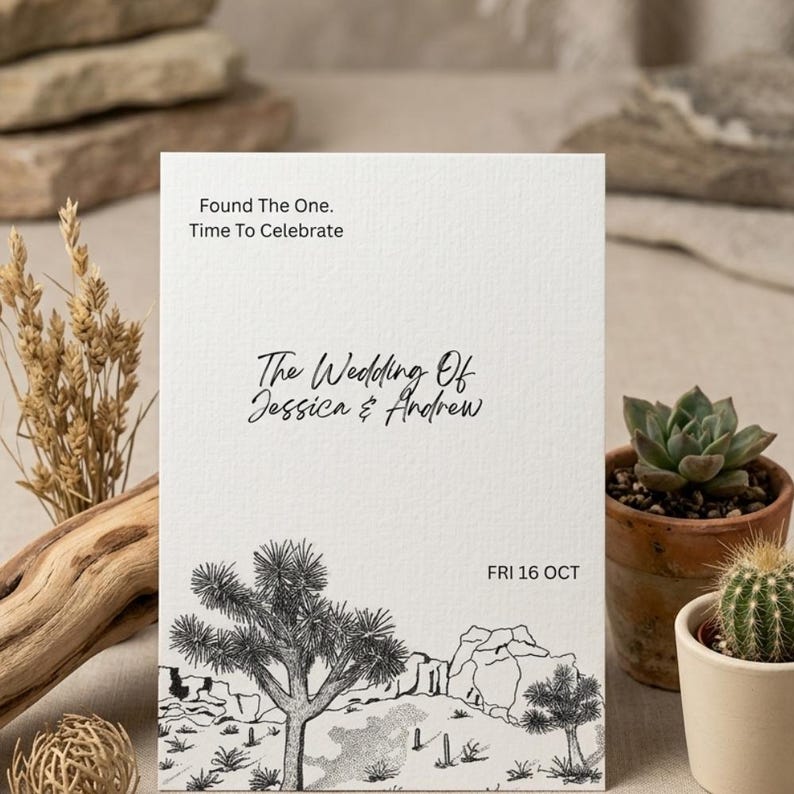
The current design pairs a hand-drawn desert illustration with editable wording in Canva. The product page lists one invitation design and a Canva Basics guide. Review the photos for the actual artwork and layout; treat additional stationery as a separate project rather than assuming the purchase is a full wedding suite.
- Personalize names, date, ceremony location and other supported text fields.
- Use the shown illustration; a new venue drawing is not part of this template purchase.
- Check the Etsy listing for current purchase and delivery details.
02
Keep desert wedding wording practical
A desert illustration tells guests about the atmosphere; the wording tells them where to go. Use the actual venue and city rather than a broad destination label if the ceremony is elsewhere. Describe an elopement celebration accurately so guests know whether they are attending the ceremony or a reception after it.
- Separate the ceremony invitation from a post-elopement celebration.
- State the reception location if it differs from the ceremony.
- Keep attire, terrain and arrival instructions on the supporting details page.
03
Build a clear wedding weekend information page
Destination guests may need lodging, transport and several event times. Keep that schedule separate from the invitation so it remains easy to update. If you are planning a park ceremony, confirm access and event arrangements with the relevant venue or authority before putting them in guest instructions.
- Use one confirmed address or meeting point for each event.
- Clarify which gatherings are optional and which need an RSVP.
- Do not use “Joshua Tree National Park” as the venue unless it is the actual ceremony location.
04
Print a desert illustration without losing the detail
The fine lines and background colors should be judged at the final printed size. After personalizing the design, check that every line of text has enough contrast. A screen preview cannot show exactly how your selected paper and printer will reproduce the illustration.
- Check file size and export settings against the printer’s requirements.
- Review a proof for legibility, crop and color.
- Keep envelope and postage costs separate from the digital design purchase.
Make it your own
A starting point for your invitation wording
Replace the placeholders with your confirmed details. Adjust the hosting line and tone to fit your celebration.
Please join us for the wedding of[Name] and [Name][Day, date] at [time][Venue name][Actual city], CaliforniaWedding details and RSVP: [website]More wedding invitation wording guidance
Final pass
Before you download or print
- Confirm the venue and actual ceremony city.
- Decide whether this is a ceremony or post-elopement invitation.
- Check the existing artwork before purchasing.
- Keep weekend logistics on a separate page.
- Proof the desert linework and text at print size.
Questions before choosing
Joshua Tree wedding invitations: FAQs
Is the Joshua Tree wedding invitation a Canva template?
Yes. The current product page describes an editable Canva invitation template. Check its listing for the included files and editing instructions.
Does the Joshua Tree template include save the dates and RSVP cards?
The current listing is for one invitation design. Ask the studio about separate coordinating pieces and confirm scope, pricing and timing.
Can I change the desert illustration to our Joshua Tree venue?
The template uses the existing illustration shown in its gallery. A different venue drawing requires a separate custom request.
Are printed Joshua Tree wedding invitations included?
No physical invitations are included in the digital template purchase. You arrange printing separately using a printer of your choice.